If you buy through our links we may earn commission, at no cost to you. How we choose and our disclosure
The best home golf simulator for most UK garages is a Square Golf package such as the GolfBays EasySim: cameras beside the ball, club and ball data, no compulsory yearly fee and a bay only 1m deep. Spend less with Costco's net bundle or more for measured data and a bigger room.
Most simulator guides rank launch monitors, then leave you to work out the rest. This one ranks setups you can buy in the UK, because a launch monitor on its own won't stop a ball or show you a fairway.
Specs come from makers and sellers. Independent comment comes from named testers such as Golf Monthly and Breaking Eighty. Every price comes from a retailer page opened on 5 November 2026. Our how we choose page explains the method. Plenty of those prices are Black November offers, so check before you buy.
Three things most simulator guides skip
- The package price is rarely the whole bill. Add a projector and five years of software and a gap of about £400 between two similar packages grows to about £1,400.
- Your ceiling decides more than your budget. GolfBays plans on 2.8m for a driver and plenty of British garages have 2.4m.
- Damp is the real enemy in a garage. Kit left cold all day attracts condensation the moment you switch on a heater.
The best home golf simulator for each room and budget
Start with the row that sounds like your house, not the row that sounds like your dream. Each name jumps to the full write-up further down.
| Best for | Home golf simulator | Why it's here | Know this first |
|---|---|---|---|
| Most UK garages | Square Golf EasySim package | Camera unit, club data, slim bay, mat included | Indoors only. Bring your own projector |
| Tightest budget | Costco Square Golf bundle | Same launch monitor with net and screen | Membership needed. A net, not a full enclosure |
| Deep rooms and the range | FlightScope Mevo Gen2 SimBox | Goes outdoors too, no yearly fee | Wants about 5m of depth |
| Most courses to play | SkyTrak+ SimBox | Around 100,000 courses, says Golf Monthly | A yearly bill from year 2 |
| Serious club data | Uneekor Eye Mini Lite SimBox | 19 metrics, no marked balls | Needs a Windows gaming PC |
| No computer at all | Garmin Approach R50 SimBox | Computer and 10 inch screen built in | Big price, plus membership for courses |
| Money no object | Trackman iO SimBox | Ceiling mounted, clear floor, measured 3D spin | Five figures and fixed in place |
| No room to hit a ball | Phigolf 2 Flex | A swing stick and a sensor, no ball at all | A game more than a practice tool |
How do you choose a golf simulator for home?
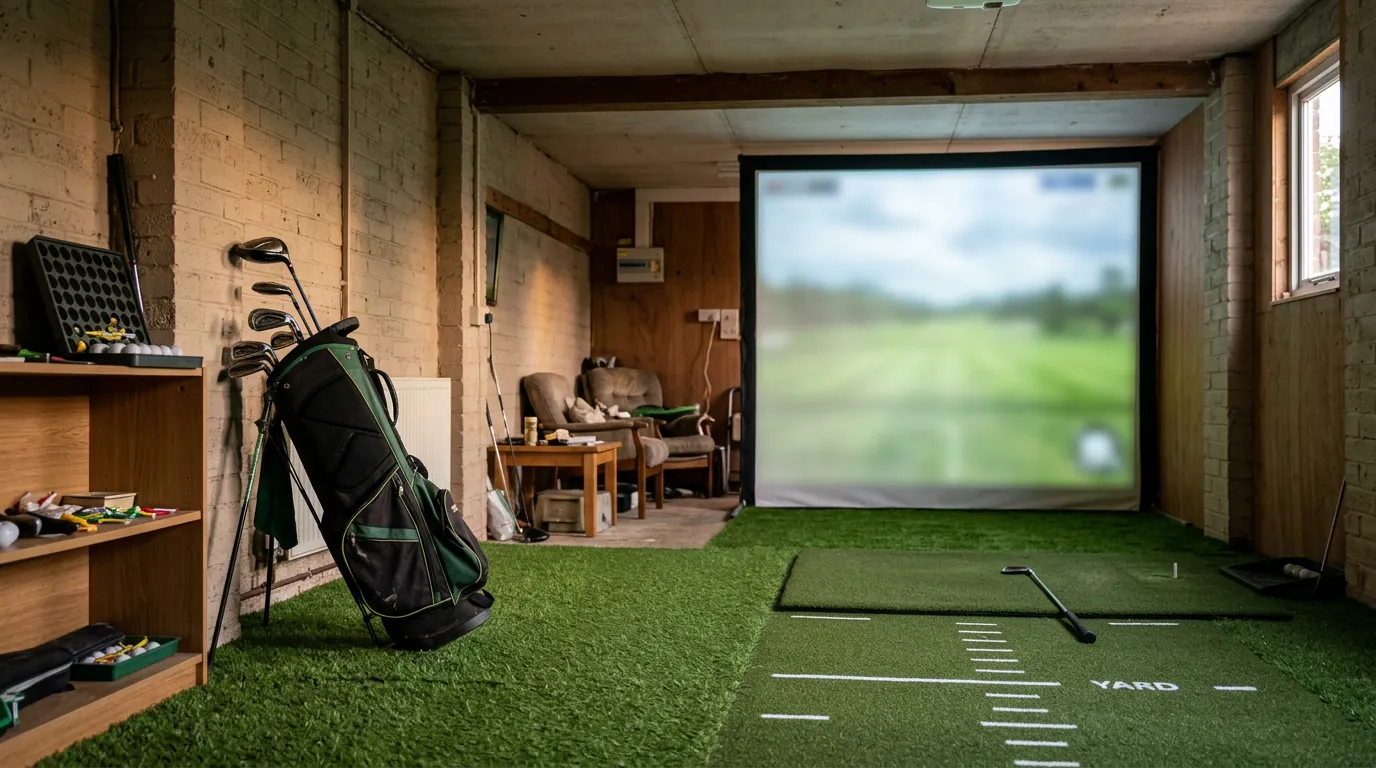
A golf simulator is five things bolted together: a launch monitor that reads the shot, an enclosure or net that stops the ball, an impact screen that takes the hit and shows the picture, a hitting mat and whatever runs the software. Four of those are close to interchangeable. The launch monitor isn't, so our guide to the best launch monitors goes through those units in far more depth than we can here.
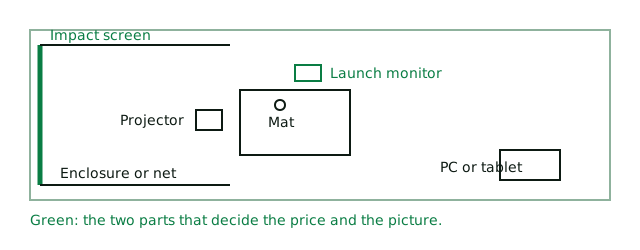
The order of your decisions matters. Measure the room first, because it may rule out half the list before you've looked at a price. Choose the launch monitor next. Everything else follows from those two.
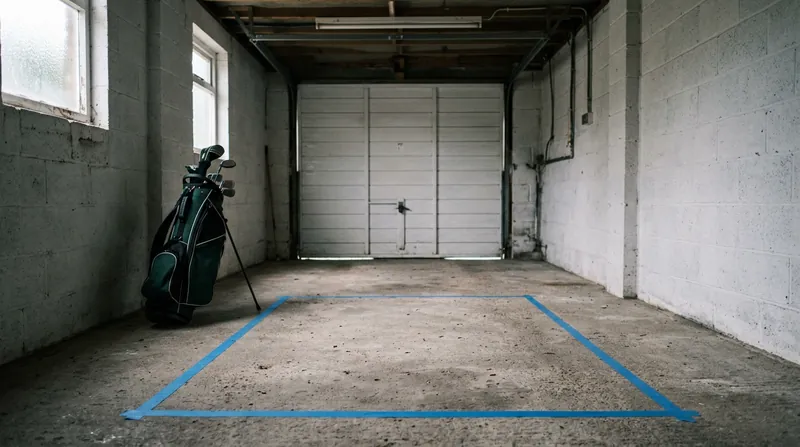
Measure the height with the door open
Height rules out more rooms than anything else. GolfBays, the Cheshire seller whose garage guide is the most useful we've read, plans on 2.8m for a full driver swing and points out that a 2.4m ceiling leaves you hitting irons and wedges. Every SimBox and EasySim frame stands at least 2.5m tall, so a room lower than that takes a net instead.
Then comes the trap. Up-and-over and sectional doors end up lying under the ceiling when they're open, so measure to the underside of the open door, its tracks, the opener rail and the motor. Beams and strip lights count too. Finish by swinging your driver slowly from where the mat will go: whatever it touches slowly, it will hit at full speed.
| Lowest point above your swing | What it means | Where to look |
|---|---|---|
| Under 2.5m | Standard enclosures won't fit. Irons and wedges only for most adults | A net, or the Phigolf and its short stick |
| 2.5m to 2.8m | An enclosure fits but a driver may not. Try the slow swing before buying | Any 2.5m SimBox or the EasySim, with care |
| 2.8m to 3m | A full driver swing for most golfers | Every floor-standing pick here |
| 3m and up | Room for tall players and the 3m-high SimBox | Everything, including ceiling units |
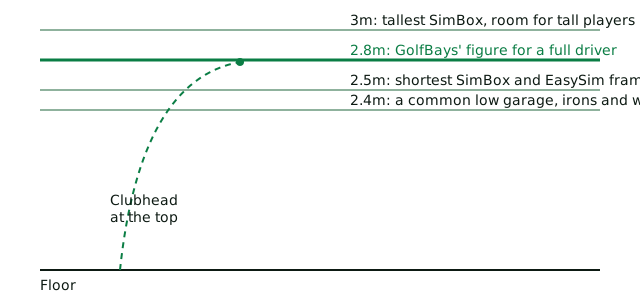
Your own height shifts all of this, so put your numbers into our golf simulator room and cost planner. It works out the ceiling you need, checks the depth against each type of launch monitor and adds up the parts as you pick them.
Radar or camera: the depth decision
A radar unit sits behind you and watches the ball fly, so it wants a long room. FlightScope asks for 8ft from unit to tee and another 8ft of ball flight on the Mevo Gen2, about 4.9m before the screen and the wall get a say. A camera unit sits beside the ball and photographs impact, so nothing has to go behind you. That's why GolfBays plans on 4.5m for a camera and 5m for radar.
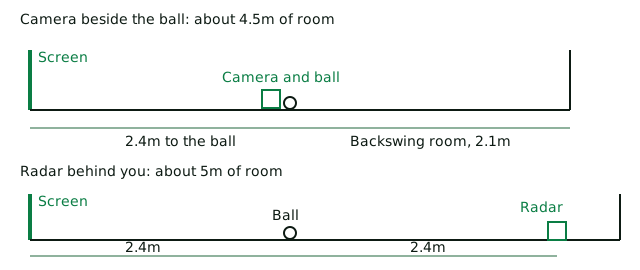
Width matters less but still catches people out. GolfBays plans on 3m at the hitting position, measured after the shelves, freezer and bikes have had their say. Left-handers should note that a camera unit has to swap sides, which is one more reason to leave a little spare on each side of the mat. Ceiling units such as Trackman and ProTee VX avoid the problem altogether, at a price.
Decide whether the car is coming back
A SimBox goes up without tools in under an hour, which is fine once a season and tiresome every night. If the car returns each evening, you need a net you can shift or a retractable screen. If it has left for the winter, a fixed enclosure makes far more sense because you only build it once.
The best home golf simulators on sale in the UK
Each of these is one thing you can order, with the launch monitor, the ball-stopping part and usually the mat in one basket. The price shown is the smallest size where there's a choice. All of them still need something from you, which the spec box spells out.
Best for most UK garages: Square Golf EasySim package
For the golfer with a normal garage, a sensible budget and winter evenings to fill.
This is the setup we'd point most people at, because it solves the problems that actually stop British simulators happening. The Square Golf launch monitor sits beside the ball on cameras, so a short garage is no bar and Breaking Eighty calls its accuracy consistently better than you'd expect for the price. It reads ball speed, launch, spin and carry, plus club path, face angle, loft and angle of attack, so you see why a shot curved as well as how far it went.
The EasySim frame is 3.3m wide, 2.5m high and only 1m deep. GolfBays pairs it with a quiet Lite impact screen, a hitting mat and a protective case. The 4:3 screen shape also makes choosing a projector simpler. There's no compulsory subscription: 1,000 welcome credits cover 55 rounds or so on the built-in courses. GSPro, E6 Connect and Awesome Golf all connect when you want more.
- Works in a short room, with club data at this money
- No yearly fee to keep it running
- Includes a swing stick for practice without a ball
- Indoors only, so it can't double up at the range
- Marked balls are part of the system and three come in the box
- One enclosure size and you'll hit quite close to the screen
Best on a tight budget: Costco Square Golf Home Studio Bundle
For anyone who wants real shots on a real screen for the least outlay.
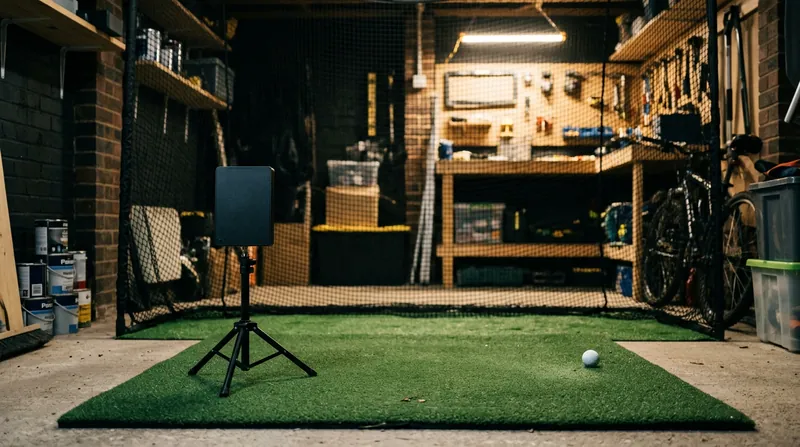
Same launch monitor, far less around it. Instead of a framed enclosure you get a 2.5m square deluxe practice net with side netting, an impact screen that bungees onto it and a small tri turf mat. A golf net is a less finished look and leaves more of the wall on show, yet it's the cheapest complete way to play on a projected picture we could find from a UK seller. A net is also far easier to shift than a frame, which suits a garage that has to hold the car again by Friday.
- Under £1,000 with delivery included when checked
- Costco lists the net for indoor and outdoor use, though the launch monitor itself stays indoors
- You need a Costco membership, online-only included
- The mat is only 64cm by 41cm, so budget for a proper hitting mat before long
Best for deep rooms and the range: FlightScope Mevo Gen2 SimBox
For the golfer who also wants their numbers at the driving range on a Sunday.
Here's the pick if your room has the length. The Mevo Gen2 combines radar with high-speed optics in a system FlightScope calls Fusion Tracking and lists 20 parameters without a yearly charge. Eight E6 Connect courses come with it to keep and OpenGolfer, which sells both, recommends this unit more than any other for home use. At about 500g it's also easy to carry to the range, which neither the Square Golf nor the Eye Mini Lite is made to do.
- One launch monitor for the garage and the range
- FlightScope charges no yearly fee for the app or the included courses
- FlightScope asks for aluminium stickers or Titleist RCT balls for accurate spin indoors
- Club path and face angle need the one-off Pro Package
- Wants about 5m of depth. In a shorter garage, go camera
Best for the most courses: SkyTrak+ SimBox package
For the golfer who'd rather play Pebble Beach on a wet Tuesday than study a spin chart.
Plenty of people buy a simulator to play golf, not to study it. That's where this one earns its place. Golf Monthly names it best for course choice, with around 100,000 on offer through the companion app. The SkyTrak+ reads ball and club with a camera plus dual Doppler radar from beside the mat. The package includes the first year of SkyTrak Core. GolfBays ranks it first among its own packages, which is worth weighing given that it sells the rest of them too.
- A huge course library for the money
- Camera position suits the same rooms as the Square Golf
- Year 2 onwards costs real money, so see the five-year table below
- GolfBays says it doesn't currently support GSPro
Best for serious club data: Uneekor Eye Mini Lite SimBox
For the low handicapper building a permanent room who wants to know exactly what the face did.
Uneekor sells ceiling-mounted units such as the Eye XO, but a rented or shared room can't always take one. The Eye Mini Lite puts the same maker's cameras on the floor beside the ball, leaves out the battery and screen a fixed room doesn't need and lists 19 metrics from two high-speed cameras. It reads any ball without markings and takes a face sticker for club data. One proviso: GolfBays has this package heavily reduced for November, so a later price may look very different and the sums below may not hold.
- Works in the same short room as a Square Golf, with a step up in data
- GolfBays' November offer adds Uneekor's Pro package and a year of GSPro
- Needs a Windows gaming PC, which is a large extra
- Indoors only and tethered to the mains
Best with no computer: Garmin Approach R50 SimBox
For the household where nobody wants to be the IT department.
Everything else here makes somebody responsible for a laptop or a tablet. The R50 has its own 10 inch touchscreen and computer, so you plug in a projector and play: three cameras, more than 15 metrics and over 43,000 courses through Garmin's Home Tee Hero. Golf Monthly names it the top pick in its own guide for exactly this reason. Scottsdale also sells the R50 on its own if you already have an enclosure.
- The simplest setup here to live with
- Sits beside the ball, so it suits a shorter room
- Courses need an active Garmin Golf membership
- Golf Monthly's one gripe is crouching down to change settings
- Club data needs a sticker on the face and 250 come in the box
Best if money's no object: Trackman iO Home SimBox
For a room that will stay a golf room for good.
Golf Monthly calls Trackman the undisputed gold standard. The iO is its first launch monitor built purely for indoors: radar, infrared and high-speed imaging in a unit on the ceiling, measuring 3D spin and spin axis rather than estimating them. Trackman sets no minimum distance in front of or behind the ball and nothing on the floor can trip a child or catch a follow-through. It's also fixed in place and priced for people building a dedicated room, so most home golfers will be better served by the picks above.
- A completely clear floor
- Left and right-handers can share it without moving kit if you add the DUO version
- Five figures before a projector or computer
- Ask about software plans before you pay, as we couldn't confirm UK figures
Best with no room to hit: Phigolf 2 Flex
For flats, low ceilings, children and the merely curious.
Strictly, this isn't a golf simulator in the sense of the others, as no ball leaves the ground. A sensor on a short swing stick reads your swing and the app turns it into a shot on a phone, tablet or mirrored TV, with more than 38,000 courses listed by the maker. It's a game first and a practice tool a long way second, but it's the only pick here under £500 and you can play it in a living room.
- Needs almost no space and no projector
- The sensor can also go on your own club outdoors
- No launch data from a struck ball, so it can't tell you how far your 7-iron really goes
- Check the app's current plans before relying on course access
Still comparing? Line the setups up side by side in the tool below, with each spec on the same row.
What a home golf simulator really costs over five years
The sticker price flatters some of these. To compare them fairly, we've added a budget projector, a gaming PC where one is required and five years of the software each setup leans on. The Mevo Gen2 stays under £3,000 for the whole five years, while the SkyTrak+ package, only about £400 dearer on the day, ends up about £1,400 dearer.
| Setup | Package | Projector | PC | Five years of software | Total |
|---|---|---|---|---|---|
| Costco Square Golf | £900 | £899 | Own tablet | £42 one year of Costco membership, then credits | £1,841 |
| EasySim Square Golf | £1,803 | £899 | Own tablet | £0, credits included | £2,702 |
| Mevo Gen2 SimBox | £2,018 | £899 | Own tablet | £0, 8 courses kept | £2,917 |
| SkyTrak+ SimBox | £2,428 | £899 | Own tablet | £1,000, four years of Core at £249.99 | £4,327 |
| Eye Mini Lite SimBox | £3,100 | £899 | £1,000 | £0 on Uneekor's own software | £4,999 |
| Garmin R50 SimBox | £5,362 | £899 | Built in | £450, Garmin Golf at £89.99 a year | £6,710 |
We've left Trackman and Phigolf out, because we couldn't confirm their UK software costs. A yearly GSPro or Awesome Golf plan would raise any of these totals. Delivery, electrics and building work come on top. A tablet may also need an HDMI adaptor to reach the projector.
Package or your own parts?
Buying the parts separately rarely saves much, as a quick sum shows. At Scottsdale, the Square Golf launch monitor, the SimSpace enclosure with frame, canopy and screen and a SimSpace standard mat came to about £66 more than the EasySim package on the day we checked. Scottsdale was also offering 10% off selected SimSpace products with a launch monitor, which would close that gap. So build your own for the choice of parts or the shop you trust, not for the saving.
What the screen, projector and mat actually do
Once the launch monitor is settled, three parts decide how good it looks and how your joints feel next morning.
The golf impact screen
An impact screen has to stop a driven ball again and again while still showing a sharp picture. SimSpace says its three-layer Platinum screen reduces noise and GolfBays designs its Lite screen to stay quiet, which matters in a garage sharing a wall with next door. If noise is a worry, ask about foam backing as well. Packages here include a screen, so this only becomes a choice when you buy an enclosure or upgrade one.
The golf simulator projector
Nearly every package leaves the projector out. You want a short throw model, one that sits close to the screen so you don't cast a shadow on the ball. GolfBays suggests 3,000 lumens or more in a garage you can darken and 4,000 if the lights stay on, with full HD plenty for most home screens. Its budget choice is the Optoma GT2200HDR and its first choice is the 4K BenQ AK700ST, which costs well over twice as much. Keep the lights over the mat and the darkness at the screen end, because a strip light running the length of a garage will wash the picture out.
The hitting mat
Do this part properly. A hard mat over concrete is what your wrists and elbows will remember long after the round on screen. The 1.5m mats in the SimBox packages are a fair start, while the Costco bundle's small tri turf mat is one to replace first. If you're short on money, cut the projector budget before the mat budget. GolfBays notes that camera units beside the ball read putts well. If you've gone for radar and care about the short game, add a proper putting mat.
Getting a British garage ready
The big American guides barely mention this, yet it's what hurts kit over here. On a winter evening your kit has sat at close to the outside temperature all day. Switch on a fan heater and the air warms long before the projector lens does, so moisture lands on the coldest thing in the room. GolfBays' advice is sensible and cheap to follow.
- Buy a cheap hygrometer and find out whether you have a damp problem at all
- Run a dehumidifier between sessions through the colder months
- Keep a low background heat on, using an oil-filled radiator or panel heater, never gas or paraffin
- Carry the launch monitor and laptop indoors after every session
- Fix leaks first, because no dehumidifier keeps up with water coming in
- Count your sockets: projector, PC, charger, light, heater and dehumidifier is six plugs already
That last point can involve the law. In England, electrical work in a home must meet Part P of the Building Regulations and the government's Approved Document P is the place to start. GolfBays notes that a new circuit, including one to a detached garage, is notifiable where a socket on an existing circuit isn't. A registered electrician can certify the work, which is money well spent when the room also holds a heater and a four-figure projector.
Is a home golf simulator worth it and what would we skip?
It depends on what you'll do on a wet February night. For a keen golfer who'd otherwise pay range fees through winter, any of these can earn their keep. For someone who plays six times a year, a good net and a launch monitor will cover most of the practice at a fraction of the outlay. Our guide to golf practice nets will get you started. If you're unsure what else might help more, have a look at our best golf gadgets first. A simulator is a big way to spend money that might buy several lessons and a rangefinder.
Some well-known names don't make our list for good reasons. The Foresight GC3 and GCQuad are excellent, but OpenGolfer itself, which sells them, reserves them for commercial bays and fitting studios. The Full Swing KIT is a radar that sits 3.05m behind the ball, so it asks for more room at a higher price than the camera units. The Garmin R10 SimBox costs more than the EasySim and wants the deeper room too, so it only makes sense if you already own an R10 or want one for the range. Bushnell's Launch Pro and the ceiling-mounted ProTee VX suit a permanent room if you have the budget. Rapsodo's MLM2PRO is cheaper to buy but relies on a yearly plan for its best features, as our launch monitor guide explains.
Once your simulator is running, check your numbers against our golf club distance chart and use the golf gadget comparison tool if you're weighing up a launch monitor on its own instead.
The bottom line
- Measure the height first, with the door open and a slow driver swing.
- Under 4.5m deep or on a budget, buy camera: start with the EasySim package.
- Five metres deep and keen on the range: the Mevo Gen2 SimBox.
- Add a projector, a decent mat and a dehumidifier to your sums before you order.
Your questions answered
How much does a home golf simulator cost in the UK?
A net bundle with a launch monitor starts under £1,000 and a full enclosure package from around £1,800. Add a projector and you're looking at roughly £1,800 to £3,000 for a good home setup. Camera packages with a PC or a built-in computer run from about £5,000 to £7,000 over five years and ceiling-mounted Trackman setups pass £14,000 before extras.
What size room do I need for a golf simulator?
GolfBays plans on 3m wide, 2.8m high and 4.5m deep for a full driver swing with a camera launch monitor, or 5m deep with a radar unit behind you. Golf Monthly's lower minimum is 8.5ft high, about 2.6m. Try a slow driver swing in the room before you buy.
Can I fit a golf simulator in a 2.4m garage?
Not for a full driver swing, for most adults. GolfBays says a 2.4m ceiling means hitting irons and wedges and its enclosures stand at least 2.5m tall, so that garage takes a net. A short golfer may manage more, so test it with a slow swing. Beams and door gear count too.
Do I need a PC for a home golf simulator?
Not always. The Square Golf, Mevo Gen2 and SkyTrak+ can run from a phone or tablet app and the Garmin R50 has its own computer. The Uneekor Eye Mini Lite needs a Windows PC and GSPro only runs on Windows, so budget about £1,000 to £1,750 for a gaming PC or laptop if you want either.
Which golf simulators have no subscription?
The Square Golf has no compulsory fee and includes 1,000 credits for its built-in courses, while the FlightScope Mevo Gen2 keeps its 8 E6 Connect courses with no yearly charge. SkyTrak and Garmin charge yearly for their course play, so check the five-year table above before deciding.
Is a net or an enclosure better for a home simulator?
An enclosure suits a room that stays set up. A net is cheaper and easier to move, which suits a garage where the car returns at night. Both need an impact screen in front if you want a projected picture.
Can left-handed golfers use a home simulator?
Yes. A camera unit beside the ball has to swap sides, so allow room on both sides of the mat. GolfBays suggests 4m of width if a left-hander and a right-hander will share the same mat. Trackman's DUO version of the iO is built to serve both from the ceiling.
Where these facts came from
- Golf Monthly's picks and comments on the Garmin R50, SkyTrak+ course count and Trackmanchecked 5 November 2026
- Breaking Eighty on Square Golf accuracy and subscriptionchecked 5 November 2026
- Golf Simulator Videos on Square Golf balls, Eye Mini Lite software plans and the R50 projector connectionchecked 5 November 2026
- OpenGolfer's Mevo Gen2 recommendation, Foresight and Full Swing KIT commentschecked 5 November 2026
- Garage heights, door gear, damp, heating, sockets and Part P noteschecked 5 November 2026
- GolfBays' ranking of its own packages and its room depthschecked 5 November 2026
- Short throw projector advice, lumens and projector priceschecked 5 November 2026
- EasySim package price, size and contentschecked 5 November 2026
- Mevo Gen2 SimBox package price and contentschecked 5 November 2026
- SkyTrak+ SimBox package price and SkyTrak plan priceschecked 5 November 2026
- Eye Mini Lite SimBox price and November offerchecked 5 November 2026
- R50 SimBox package price and contentschecked 5 November 2026
- Trackman iO SimBox package price and contentschecked 5 November 2026
- Garmin R10 SimBox package pricechecked 5 November 2026
- Costco bundle price, contents, net and mat sizes, credits and Square Golf data pointschecked 5 November 2026
- Costco online-only membership feechecked 5 November 2026
- Mevo Gen2 parameters, Fusion Tracking, 8ft setup distances and indoor spin requirementschecked 5 November 2026
- Eye Mini Lite cameras, metrics, PC requirement and indoor-only usechecked 5 November 2026
- Trackman iO technology, no minimum distances and the DUO versionchecked 5 November 2026
- Phigolf 2 Flex course count, swing stick and sensorchecked 5 November 2026
- SimSpace enclosure and mat prices at Scottsdalechecked 5 November 2026
- Square Golf price and SimSpace offer at Scottsdalechecked 5 November 2026
- Phigolf 2 Flex price at Scottsdalechecked 5 November 2026
- Awesome Golf UK membership priceschecked 5 November 2026
- Garmin Golf yearly membership pricechecked 5 November 2026
- A gaming PC at around £1,000checked 5 November 2026
- Part P of the Building Regulations for electrical work in English homeschecked 5 November 2026
Spotted something out of date? Tell us and we'll fix it.