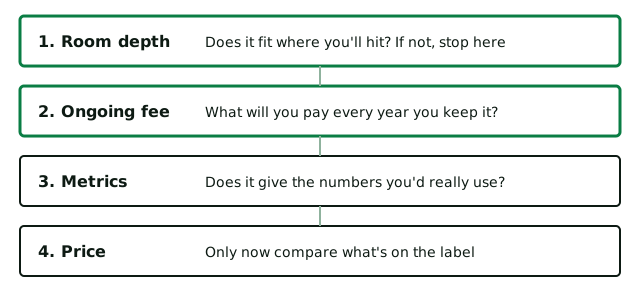
This launch monitor comparison puts six golf launch monitors on sale in the UK side by side, row by row, with each price in pounds and the date we checked it. Choose up to four below. Read room depth and ongoing fee first, because those two rows decide most purchases.
The same tool also compares rangefinders, GPS watches, handheld GPS units, electric trolleys and more. Each feature comes from the maker, each price from a UK retailer or maker page and both carry a date. Our how we choose page sets out the method. This is one of our free golf tools, with no sign-up.
Three things this page adds
- Each launch monitor price is in pounds, with the date it was checked.
- A subscription gets added to the box price, so you can see when the cheaper unit stops being cheaper.
- You get the rows that mislead, including which data is measured and which is worked out.
How to use the golf gadget comparison tool
- Pick the type of gadget. Launch monitors load first. Change the drop-down for anything else.
- Type your budget. Anything dearer drops off the list. Leave it empty to see every device.
- Tap up to four. Tap one again to take it off.
- Read down the rows. "Not listed" means the maker's page doesn't give that spec, so treat it as unknown. It doesn't mean the feature is missing.
- Follow "Read our notes" for the reasoning. It opens that device in its buying guide. Press Reset to start again.
How the launch monitor comparison works
There's no scoring and no secret ranking. The tool does two simple things. It keeps a device on the list when its price is at or under your budget, then it lines up the same rows for each one you chose. We don't give any device a mark out of ten, because the best launch monitor for a deep garage can be useless in a box room.
The one sum it can't do for you is the running cost, so here it is: five-year cost = unit price + (yearly plan × 5). A subscription for the app or the simulator software looks small next to the price on the box until you multiply it.
| Golf launch monitor | Unit, 4 Nov 2026 | Yearly subscription | Five-year cost |
|---|---|---|---|
| Shot Scope LM1 | £189 | None | £189 |
| Square Golf | £679 | None, 1,000 course credits, then pay as you go | £679 |
| Garmin Approach R10 | £429.99 | Garmin Golf, £89.99, optional | £879.94 |
| FlightScope Mevo Gen2 | £1,019 | None | £1,019 |
| Rapsodo MLM2PRO | £549.99 | Core, £159.99 | £1,349.94 |
| Garmin Approach R50 | £4,299.99 | Garmin Golf, £89.99, for courses | £4,749.94 |
Some of these are Black November sale prices. Garmin's own page lists the R10 higher than Scottsdale Golf does. Third-party software such as GSPro or E6 Connect costs extra on any of them.
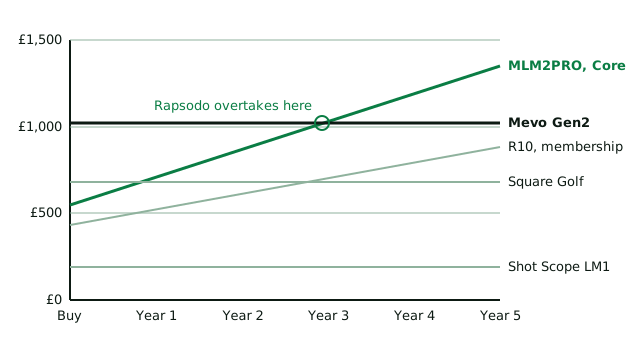
Two pairs of lines cross, which no page we read in the top search results points out. The MLM2PRO starts well under the Mevo Gen2 but passes it in the third year of paying for Core. The R10 with membership passes Square Golf in the third year too. If you'd cancel the subscription after a winter, the cheaper box wins. If you'd keep paying for the app and courses, it often doesn't.
A worked example: a 5m garage and a £700 budget
Say your garage measures 5m from the back wall to the door and you'd like a home simulator for the winter. Type 700 into the tool. The R50 and the Mevo Gen2 drop off, leaving four. Choose all four and read the rows in order.
- Garmin R10: 6.4m of room depth and a membership for Home Tee Hero. It's out on this figure, so this radar needs a deeper room.
- Shot Scope LM1: sits 1.5m behind the ball with no fee. It fits, but it isn't a golf simulator and has no courses.
- Rapsodo MLM2PRO: 4.4m and a Core subscription for all 15 metrics and courses. It fits with 60cm to spare and also goes to the driving range.
- Square Golf: 3m with no subscription. This camera unit fits easily, but it's indoor only.
What the result means: it's now a choice between two devices and one question. Will this ever leave the garage? If not, the Square Golf launch monitor does the job with no yearly bill. If you'd also want outdoor practice, the MLM2PRO earns its subscription. Before you buy, run your real setup through our simulator room and cost planner. It adds the net, hitting mat and projector this tool leaves out.
Indoor, outdoor and the software behind each launch monitor
A golf launch monitor on its own only gives you data. To play a course at home you need golf simulator software as well, which is often what the subscription pays for. You may pay for it every year. Some also ask for special balls or markings before they'll read spin or club data indoors. None of that shows on the box.
| Model | Where it works | Shows data on | Course software | Extras to budget for |
|---|---|---|---|---|
| Garmin R10 | Indoor and outdoor launch monitor | Your phone or tablet | Garmin's own simulator with membership. GSPro and E6 Connect also work | None for basic data |
| Shot Scope LM1 | Indoors and outdoors | Its own screen, plus a free app | None | None |
| Rapsodo MLM2PRO | Indoors and outdoors | Phone or tablet app | 30,000+ Rapsodo courses on Core, with partner trials | RPT balls for measured spin |
| Square Golf | Indoor only | Phone, tablet or PC | Built-in courses on credits. GSPro at no extra fee | Marked balls and shaft stickers for all the club data |
| FlightScope Mevo Gen2 | Indoors and outdoors | Phone, tablet or PC | 8 E6 Connect courses included | Stickers or Titleist RCT balls indoors |
| Garmin R50 | Indoors and on the range | Its own 10 inch touchscreen | Garmin's own simulator by subscription | Club tracking stickers, in the box |
If you want a portable launch monitor, read the "Where it works" column first. A radar unit on a tripod is a natural outdoor launch monitor for range practice, because it watches the ball fly. Square Golf is the one to check: it's a camera-based launch monitor for indoor use only, so it stays at home. If you want one simulator launch monitor for the garage and something smaller for the range, PlayBetter's reviewer suggests the LM1 as a portable backup.
How much golf launch monitor data you need
Launch monitors split their data into two groups. Ball data covers ball speed, launch angle, spin rate and carry distance. Club data covers club head speed, club path, face angle and attack angle, which is whether the club is moving up or down at impact. The second group costs more to measure properly and takes more knowledge to use.
- Beginner or 25+ handicap: book lessons first, then learn your carry distance for each club. The Shot Scope LM1 is a budget launch monitor with no subscription.
- 13 to 24 handicap: carry, launch and spin data will set your gaps and show why shots curve. Compare the Garmin R10 with Square Golf.
- 5 to 12 handicap: measured spin and club data help with wedge control. Compare the MLM2PRO with the Mevo Gen2.
That's our reading of the facts above, so treat it as a starting point for your swing and your budget. Our golf club distance calculator gives you something to check your new carry data against.
The rows that mislead in any launch monitor table
Metrics: count what's measured
Ball speed is how fast the ball leaves the club. Club speed is how fast the head arrives. Smash factor divides ball speed by club speed, so it shows how cleanly you struck it. Carry is the flight alone, while total distance adds the run. A device reads some of this data directly and works out the rest, so the headline count tells you less than it seems.
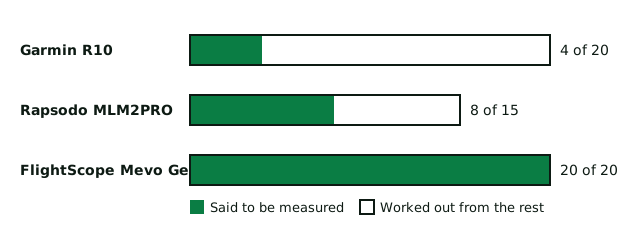
Even that count moves around. Garmin says the R10 tracks "more than a dozen" metrics, while PlayBetter counts 20 and says four are directly measured. Rapsodo says 15 for the MLM2PRO with 8 measured, but its UK membership table shows 11 on the free plan. FlightScope claims 20 parameters on the Mevo with "no calculated estimates". That's the maker's wording, so treat it as a claim. Golf Monthly's advice helps here: path and spin axis data might not even be relevant to a 25 handicapper.
Room depth: sources disagree
A maker's minimum and a retailer's comfortable setup are different things, which is why one radar launch monitor gets three answers. Buy on the larger figure unless you're willing to test the smaller one. Camera units, also called photometric units, sit beside the ball, so PlayBetter says a camera setup can work in as little as 10ft. Ceiling height matters too: FlightScope gives 9ft as the absolute minimum, so test your swing with a driver in the room first.
Accuracy: there's no row for it
That's on purpose. We can't find a like-for-like accuracy figure across these devices, so any score would be invented. Breaking Eighty says every device on its list has fans who call it accurate and critics who call it hopeless. It says wildly wrong numbers usually come from setup.
One US reviewer saw the cheap LM1 report 189 yards for a snap hook that went about 140. For accurate practice, check your setup, hit ten balls with one club and look at the spread. A trend tells you more than one reading.
Which row decides each type of gadget?
Every category has one or two rows that do the real work and others that barely differ.
| Gadget | Read this row first | Why | Row that rarely decides it |
|---|---|---|---|
| Launch monitors | Room depth | Runs from 3m to 6.4m in this list | Weight, unless you'll carry it |
| Rangefinders | Slope on or off | Rules below | Magnification, 6x or 7x on all eight |
| GPS watches | Battery in golf mode, extra fees | Up to 30 hours on one, 12 on another | Preloaded courses, 35,000+ on all ten |
| Handheld GPS | Screen | From a 23mm square to 5.5 inches | Preloaded courses, 35,000+ on all six |
| Electric trolleys | Folded size | From 510mm to 830mm long. Measure your boot | Motor, 230W on all six |
| Remote trolleys | Remote range, downhill control | Stated ranges run from 50m to 100m+ | Weight, all heavy at 14kg or more |
The rangefinder row carries a rule behind it. Rule 4.3a of the Rules of Golf allows distance from a device but doesn't allow measuring elevation changes. A committee can also ban the devices altogether with a Local Rule. So if you play competitions, look for slope you can switch off. If you're still choosing between the three kinds of distance gadget, our rangefinder, GPS or watch guide weighs them up.
What this golf launch monitor tool leaves out
- The rest of the market. Our six are a shortlist. Golfible's tool covers far more, in US dollars.
- Live prices. Each price is the figure on the date shown. Check the retailer before you buy.
- The verdict. The table can't say who a device doesn't suit. Our launch monitor buying guide does that, with six picks and the reasons behind them.
The other names you'll see
You'll meet these in any launch monitor review, so here's what the people who've reviewed them say.
- Trackman 4: Golf Monthly calls it the launch monitor you're most likely to see on PGA Tour ranges. Trackman claims a 1.5-yard landing tolerance.
- Foresight GCQuad: four cameras and, on Golf Monthly's view, one of the best for indoor practice.
- Uneekor Eye Mini Lite: Golf Monthly's pick for games. Carl's Place says Uneekor's Eye Mini range sits next to the hitting area.
- SkyTrak+: Breaking Eighty likes its Mac software but warns that GSPro and E6 are no longer directly supported. SkyTrak's newer ST Max costs more.
- Bushnell Launch Pro: built off the Foresight GC3. Breaking Eighty calls this Foresight-based unit the most accurate it has tried.
- Full Swing KIT: Golf Monthly says it's the launch monitor Tiger Woods endorses.
- Swing Caddie SC4 Pro: PlayBetter's case is a built-in screen, free E6 courses and no subscription.
If the tool shows you'd be happier with something simpler, our best rangefinders guide and our pick of the GPS golf watches cover kit that helps on the course itself.
The bottom line
- Measure the room before you open the tool. Room depth can rule a launch monitor out before price comes into it.
- Add the plan to the price, then decide how many years you'd really keep paying.
- Ask which numbers are measured and whether you'd use them.
Your questions answered
How do I compare golf launch monitors?
Start with room depth, then the subscription or app fee, then the data each launch monitor gives you and last of all the price. Use the tool at the top of this page to line up to four with the same rows, each with the date its facts were checked. It works in your browser and sends nothing to us.
Which launch monitors have no subscription?
In this tool, the Shot Scope LM1, Square Golf and FlightScope Mevo Gen2 have no required yearly fee. The Garmin R10 works without a membership, but Home Tee Hero courses need one. The Rapsodo MLM2PRO keeps all 15 metrics and its courses on the Core subscription. Third-party golf simulator software such as GSPro or E6 Connect has its own costs, whichever launch monitor you buy, so check the software before you add up the total.
Radar or camera: which is better?
Neither wins outright. Radar sits behind you and tracks the ball in flight, so it suits the range and deep rooms. A camera unit sits beside the ball, so it suits short rooms and indoor practice. Golf Monthly calls camera units the indoor choice and radar launch monitors the kings of the range. The MLM2PRO mixes cameras and radar, which gives portable outdoor use and measured spin in one device, with a subscription for all the data.
What launch monitors do the professionals use?
Golf Monthly says the Trackman 4 remains the most popular among professionals, with the Foresight GCQuad also a tour staple. It adds that Bryson DeChambeau now uses the FlightScope X3 and Dustin Johnson the Full Swing KIT. These sit well above most home budgets, so they aren't in our tool. Golf Monthly also rates the Uneekor Eye Mini Lite for games and the Full Swing KIT for shot detection.
What is the best golf launch monitor for a golf simulator at home?
It depends on your room first. For a short room, a camera-based launch monitor such as Square Golf needs about 3m. For a deeper garage, a radar opens up more software choice. PlayBetter says the Garmin R10 has the broadest simulator software support in its under $1,000 group. There's no single best golf launch monitor for every setup, so compare the features, the app and the indoor or outdoor use you'd really get from it. Our buying guide has the reasoning for each best launch monitor pick.
Can I compare rangefinders and GPS watches here too?
Yes. Change the "Type of gadget" drop-down at the top of the tool. Each type has its own rows, so rangefinders show slope and magnification while watches show battery and course count. Your budget stays in place until you change it or press Reset.
Why doesn't the price match the shop I'm looking at?
Prices are fixed on the date shown in the table and retailers change them often, especially in sales. Treat ours as a guide to the gap between each launch monitor and the next, then check the retailer's page before you buy.
Is a launch monitor worth it for a high handicapper?
Usually not as a first spend. Golf Monthly says newer golfers get a far better return from coaching. Once lessons are booked, a simple budget launch monitor can still help you learn how far each club really carries, which saves shots without changing your swing. You don't need a simulator or any software for that, so the app and subscription questions go away too. A portable unit also works at the driving range.
How much room do I need for a launch monitor at home?
PlayBetter gives about 3m of depth for camera units such as Square Golf, 4.4m for the Rapsodo MLM2PRO and 6.4m for the Garmin R10 and Mevo Gen2. FlightScope's own minimum for its radar launch monitors is 4.9m. Allow at least 9ft of ceiling height and test your driver swing before you buy. A camera setup also leaves more of an indoor room free for a net and a hitting mat. Our planner tool works this out from your own measurements.
Where these facts came from
- Garmin R10 UK pricechecked 4 November 2026
- Shot Scope LM1 UK pricechecked 4 November 2026
- Square Golf UK price and creditschecked 4 November 2026
- FlightScope Mevo Gen2 UK pricechecked 4 November 2026
- MLM2PRO UK price, 15 metrics with 8 measuredchecked 4 November 2026
- Rapsodo Core plan price and metrics on each planchecked 4 November 2026
- Garmin Approach R50 UK pricechecked 4 November 2026
- Garmin R10 list price and metrics wordingchecked 4 November 2026
- Garmin Golf membership price in the UKchecked 4 November 2026
- Mevo Gen2 parameters, wording on calculated estimates and recurring feeschecked 4 November 2026
- FlightScope's minimum room depth and ceiling heightchecked 4 November 2026
- Room depth for each launch monitorchecked 4 November 2026
- R10 metrics count, LM1 mishit example, what LM1 and Square Golf readchecked 4 November 2026
- Room depth for radar unitschecked 4 November 2026
- Advice on metrics for a 25 handicapper and on coaching firstchecked 4 November 2026
- Setup as the main cause of poor readingschecked 4 November 2026
- US dollar comparison covering high-end launch monitorschecked 4 November 2026
- Rule 4.3a on distance and elevation, Local Rule G-5checked 4 November 2026
Spotted something out of date? Tell us and we'll fix it.